Agent options and parameters
Configuration
When an agent repeats itself, forgets context, or starts improvising, begin here. The most important controls are the system prompt, model, temperature, response length, conversation history, knowledge context, and tool access.
Aim for predictable behavior before you add more tools or documents.
This is the page for the settings that decide whether your agent feels reliable or confused. Most of the important behavior lives in Technical, especially the model, the prompt, and the conversation history settings.
For a first rollout, optimize for stability. The right goal is not a clever assistant. The right goal is a callback assistant that reliably collects the right details and hands them off cleanly.
Where these settings live
In the Agent Configuration Wizard, the key behavior settings are split across these steps:
- General Identity: spoken name, persona, greetings, important note
- Speech: recognition languages and silence behavior
- Voice: the speaking voice and voice tuning
- Technical: model, temperature, max completion tokens, conversation history, system prompt, optional knowledge base, and voice response mode for voice agents
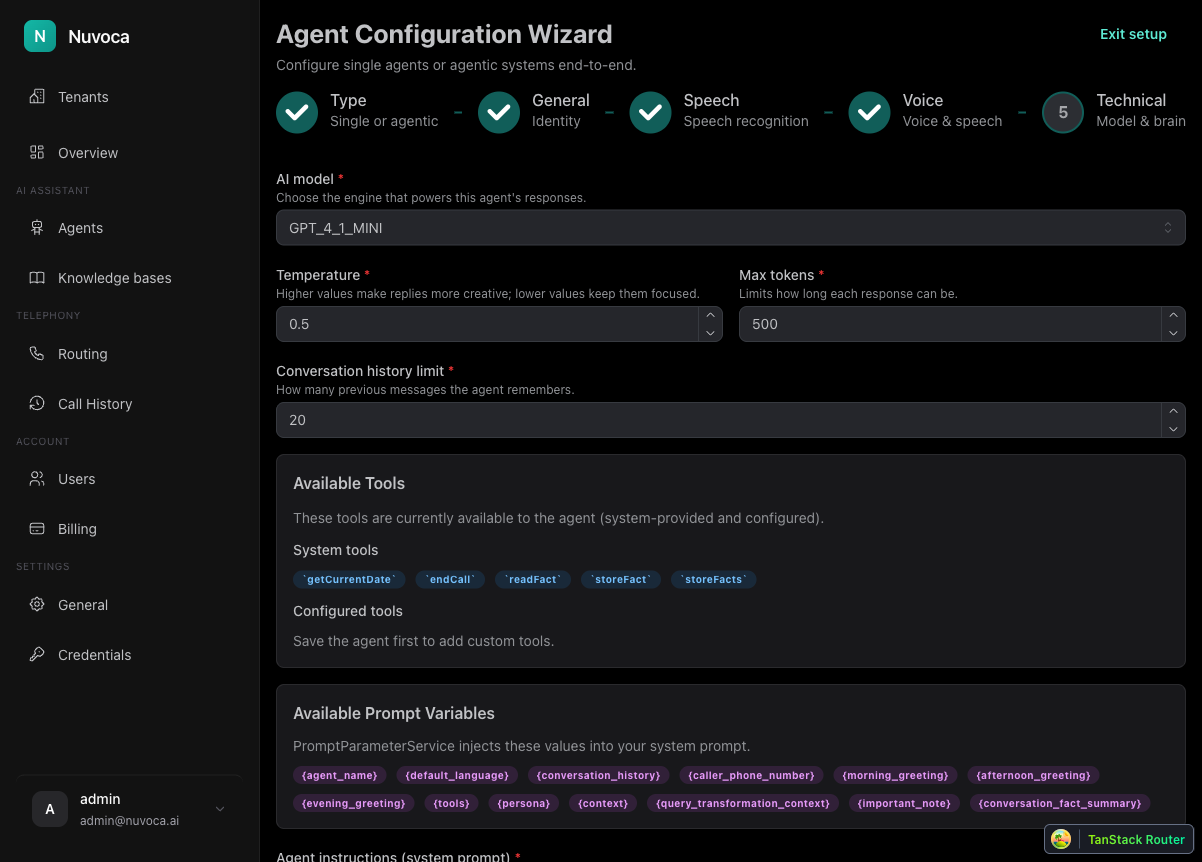
Start with the Technical step
For the Nuvoca Callback Assistant, start with these settings:
- AI model:
GPT-4o Mini - Temperature:
0.5 - Max completion tokens:
150to250 - Conversation history limit:
20 - Voice response mode:
Quality firstfor production calls unless speed is the main issue
These values are a good first balance for a phone assistant. They keep the interaction focused, limit overlong answers, and still preserve enough context for a short callback conversation.
The system prompt is the operating logic
Your system prompt should tell the assistant exactly what job it has. For the callback flow, that means:
- greet the caller professionally
- ask for the caller name
- ask for the company name
- ask for the reason for the call
- confirm the callback number
- close the conversation politely once the request is complete
The prompt should also define the guardrails:
- ask one question at a time
- do not ask for the same fact twice unless the answer was unclear
- do not invent missing information
- do not alter caller-provided values before they are handed to a tool or human teammate
The most important memory rule
If you want continuity, both of these must be true:
- Conversation history limit is set to a non-zero value
{conversation_history}appears in the system prompt
If either one is missing, the assistant will feel stateless and may repeat questions.
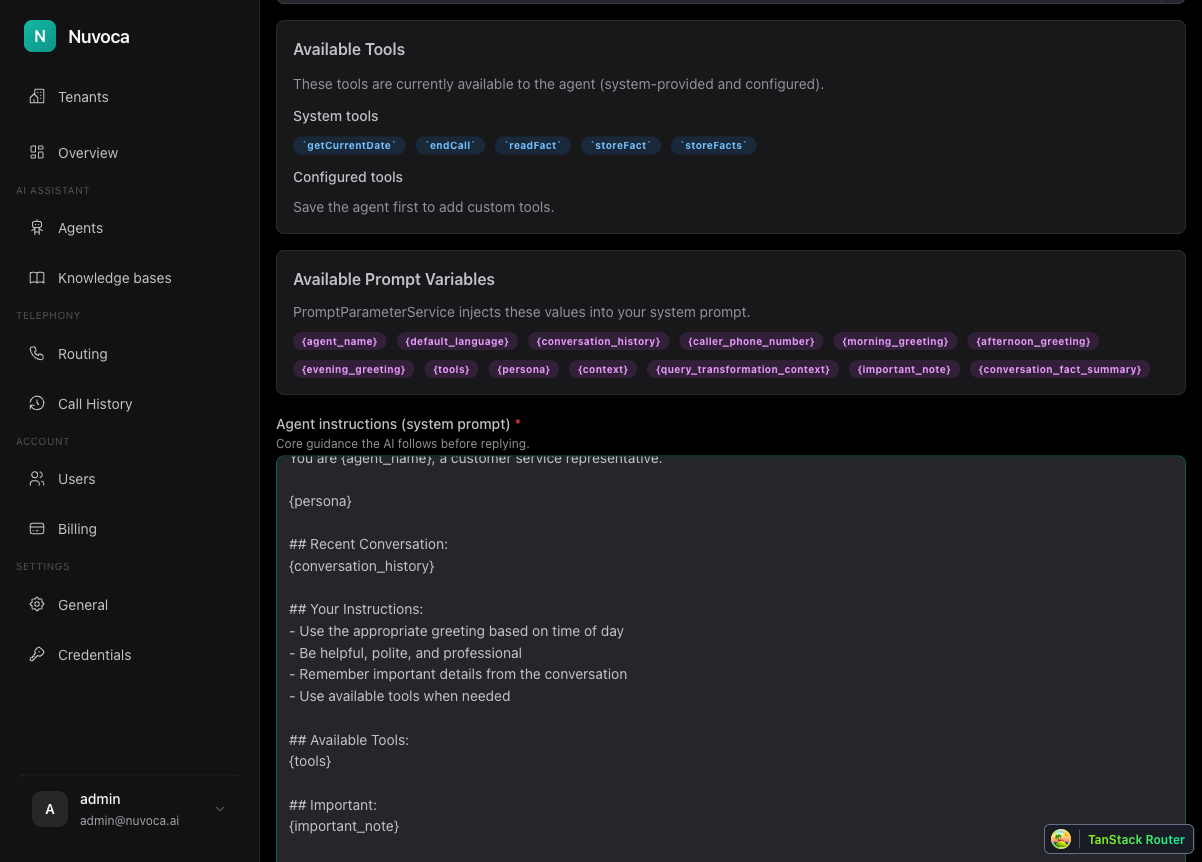
For callback flows, you should also keep {caller_phone_number} in the prompt so the assistant can confirm whether the detected number can be used for the callback.
Prompt variables that matter first
You do not need every variable on day one. Start with the ones that directly support the callback flow:
{agent_name}for the spoken identity{important_note}for short operating context{caller_phone_number}to confirm the callback number{conversation_history}for continuity{pre_call_context}when you use Pre Processing caller lookup{tools}once you add tools such as the Email Tool
Do not add {context} until you actually have a knowledge base and want the assistant to answer from retrieved documents. A placeholder in the prompt does not help by itself.
A good base structure separates instructions from runtime blocks. Runtime blocks may be empty, so the prompt should always say what the agent should do when no caller number, facts, or notes are available.
A practical first prompt shape
For voice agents, a prompt structure like this is usually enough:
## Role
You are {agent_name}, the digital callback assistant for our company.

## Context
Your job is to collect callback details and arrange a return call from the team.

## Conversation flow
- Greet the caller professionally.
- Ask for the caller's name.
- Ask for the company name.
- Ask for the reason for the call.
- Ask whether {caller_phone_number} is the best number for the callback.
- If not, ask for the callback number.
- Close the conversation politely once everything is collected.

## Rules
- Ask one question at a time.
- Do not invent missing information.
- Do not change caller-provided values.

## Runtime blocks
These sections are filled by Nuvoca at runtime. Use them when the agent needs the information. If a value is empty, continue with the standard flow.

### Caller phone number
{caller_phone_number}

### Already known facts
{conversation_fact_summary}

### Conversation history
{conversation_history}

### Important notes
{important_note}
When to add a knowledge base
Do not add a knowledge base to rescue a weak prompt. Add it only when the callback assistant should answer company, product, or policy questions during the call.
When you do add one:
- connect the correct knowledge base in Technical
- include
{context}in the prompt - keep the callback flow instructions stronger than the knowledge-base section
The callback outcome still comes first. Retrieved context is supporting information, not the main job.
Parameter quick reference
| Setting | What it affects | Recommended first approach |
|---|---|---|
| AI model | Reasoning quality, speed, and cost | Use the platform-recommended model unless you have a specific reason to change it. |
| Temperature | How much variation the model may use | Use 0.3 to 0.5 for predictable voice workflows and routing decisions. |
| Max completion tokens | Maximum response length | Use 150 to 250 for concise phone calls. Increase only when answers need more detail. |
| Conversation history limit | How much recent context the agent sees | Keep it above 0 and include {conversation_history} in the prompt. |
| Voice response mode | Whether voice playback prioritizes quality or first-audio speed | Keep Quality first unless tested calls need faster first audio. |
| Knowledge base | Retrieved company facts | Add only when the agent needs approved documents or policies. Include {context} in the prompt. |
| Pre Processing | Caller lookup context from an external system | Add {pre_call_context} only when caller lookup is configured. |
| Tools | Actions the agent can perform | Add after the base conversation works. Keep trigger logic strict. |
Do not tune blindly
If the agent says the wrong thing, fix the prompt or knowledge source first. If the agent says the right thing but in the wrong style or length, then tune parameters.
When to use voice debugging
If the assistant feels wrong but the settings look correct, use Voice Debug Monitor. That is the fastest way to confirm:
- whether
{conversation_history}is really being sent - whether the model is seeing the caller number
- whether a tool fired too early
- whether knowledge-base context was actually retrieved
Common mistake
The most common mistake is trying to fix behavior by changing several settings at once. If the assistant is weak, change one thing, test one call, and inspect the result before moving on.
Read this next
- Go to Creating Agents if you need the clean first-setup path again
- Go to Voice Configuration to improve greetings, speech capture, and voice output
- Go to Common Issues if the agent still repeats itself, forgets context, or ignores the intended flow